
You can check Phone Information of your smartphone. Phone name, OS version, battery status and storage space can be checked by pConnect!
You can open Phone Information screen from either A or B:
A. Click/tap tile of “Mobile Info” in Quick Start menu
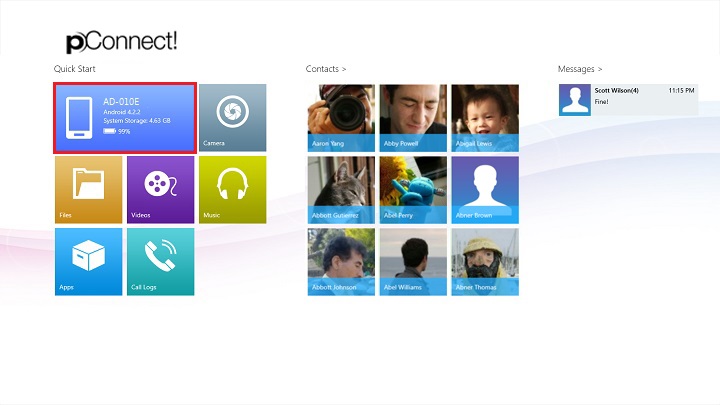
B. Click/tap “Phone Information” from Flyout menu of each contents
Below images show open “Phone Information” from Photos menu.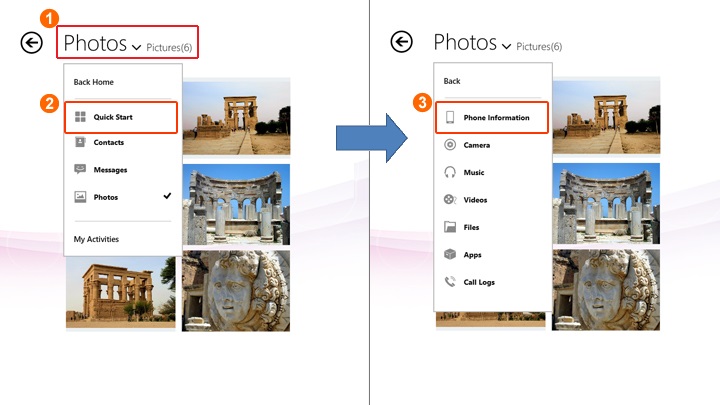
Phone Information page shows the storage and memory status, OS version, battery status and the phone name.
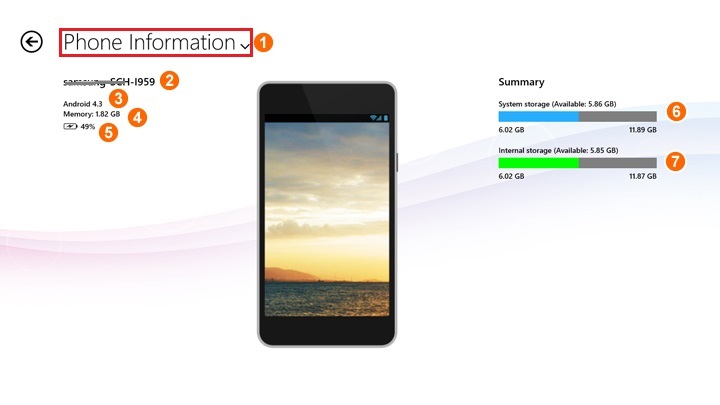
Note: External storage (SD card) information will not be shown
| ① | Flyout control |
| ② | Phone name (Vender - Model name) |
| ③ | OS version |
| ④ | Total memory size(RAM) |
| ⑤ | Available battery status |
| ⑥ | System storage status: storage used by Android OS application and other system application. |
| ⑦ | Internal storage status: storage used by user data in the mobile device. |
